Logo
  • TreeAMS Website
    • TreeAMS Wiki
      • TreeAMS Wiki
    • FAQ
      • Getting Started & General Questions
      • Access, Login & Account Issues
      • Attendance & Timeclock FAQ
      • Insight, Dashboard & Reporting
      • Task, Assignment & Workflow
      • Issue Tracker & Insident Management
    • Getting Started
      • Setting Up Your Site
      • Desk vs Portal
      • Private vs Public Media Content
      • Customising Your TreeAMS Site
    • TreeAMS App
      • How to Add a TreeAMS Shortcut to Your Home Screen
    • Attendance
      • Attendance Feature
    • Insights
      • Introduction to TreeAMS Insights
      • Navigate TreeAMS Insights
    • Reports
      • Introduction to TreeAMS Reports
      • How to Use Reports in TreeAMS
    • Organisation
      • TreeAMS Organisation Introduction
      • Organisation Structure
      • Branch & Unit Details
      • Geolocation Setup
      • Address & Contact Setup
    • Legal Documents
      • Legal Dashboard Introduction
      • Legal Document Setup
      • Document Reminder
    • Documents
      • TreeAMS Drive Introduction
    • User
      • User Types
      • Adding & Disabling a User
      • Setting the Language in TreeAMS
    • Teams
      • Setting Up Teams
    • Content
      • TreeAMS Content Introduction
      • Content Types: Blocks vs Collections
      • Content Category
      • Content Permission
      • Content Block: Article
      • Content Block: Video
      • Content Block: Checklist
      • Content Block: Quiz
      • Content Block: Evaluation
      • Content Block: Audit
      • Content Block: PDF Files
      • Content Block: PowerPoint
      • Content Block: Slides
      • Content Block: Workflow
      • Content Collection: Manual
      • Content Collection: Training Course
      • Content Collection: Audit Program
    • Products
      • TreeAMS Products Introduction
      • Adding a Supplier
      • Adding a Product
      • Creating a Product List
      • How to Use Product Cart
      • How to Use Product Order
      • How to Use Product Level
    • Assignment
      • Types of Task in TreeAMS
      • Add New Assignment
      • Assigning a Checklist
      • Assigning a Training
      • Assigning an Audit
      • Assigning a Workflow
      • Assigning a File Upload Task
      • Assigning a File Download Task
    • Finance Entry
      • Finance Entry Introduction
      • Finance Entry Setup
    • Conduct Assignments
      • Introduction, Library, Checklist & Training
      • Conduct Audit for Auditor
      • Conduct Audit for Assignee
      • Conduct a Checklist
      • Conduct a Training
      • Conduct a Workflow in TreeAMS
    • Issue Tracker
      • What is Issue Tracker?
      • Issue Dashboard Introduction
      • How to Use the Issue Tracker
      • Set Up Issue Tracker
    • πŸ“ Release Notes
      • February 2026
      • January 2026
      • December 2025
      • November 2025
      • October 2025
      • September 2025
      • August 2025
      • July 2025
      • June 2025
      • May 2025
      • April 2025
      • March 2025
      • February 2025
    Edit Sidebar
    Add Group
    View Sidebar
Review Changes

				
  • TreeAMS Wiki
    • TreeAMS Wiki
  • FAQ
    • Getting Started & General Questions
    • Access, Login & Account Issues
    • Attendance & Timeclock FAQ
    • Insight, Dashboard & Reporting
    • Task, Assignment & Workflow
    • Issue Tracker & Insident Management
  • Getting Started
    • Setting Up Your Site
    • Desk vs Portal
    • Private vs Public Media Content
    • Customising Your TreeAMS Site
  • TreeAMS App
    • How to Add a TreeAMS Shortcut to Your Home Screen
  • Attendance
    • Attendance Feature
  • Insights
    • Introduction to TreeAMS Insights
    • Navigate TreeAMS Insights
  • Reports
    • Introduction to TreeAMS Reports
    • How to Use Reports in TreeAMS
  • Organisation
    • TreeAMS Organisation Introduction
    • Organisation Structure
    • Branch & Unit Details
    • Geolocation Setup
    • Address & Contact Setup
  • Legal Documents
    • Legal Dashboard Introduction
    • Legal Document Setup
    • Document Reminder
  • Documents
    • TreeAMS Drive Introduction
  • User
    • User Types
    • Adding & Disabling a User
    • Setting the Language in TreeAMS
  • Teams
    • Setting Up Teams
  • Content
    • TreeAMS Content Introduction
    • Content Types: Blocks vs Collections
    • Content Category
    • Content Permission
    • Content Block: Article
    • Content Block: Video
    • Content Block: Checklist
    • Content Block: Quiz
    • Content Block: Evaluation
    • Content Block: Audit
    • Content Block: PDF Files
    • Content Block: PowerPoint
    • Content Block: Slides
    • Content Block: Workflow
    • Content Collection: Manual
    • Content Collection: Training Course
    • Content Collection: Audit Program
  • Products
    • TreeAMS Products Introduction
    • Adding a Supplier
    • Adding a Product
    • Creating a Product List
    • How to Use Product Cart
    • How to Use Product Order
    • How to Use Product Level
  • Assignment
    • Types of Task in TreeAMS
    • Add New Assignment
    • Assigning a Checklist
    • Assigning a Training
    • Assigning an Audit
    • Assigning a Workflow
    • Assigning a File Upload Task
    • Assigning a File Download Task
  • Finance Entry
    • Finance Entry Introduction
    • Finance Entry Setup
  • Conduct Assignments
    • Introduction, Library, Checklist & Training
    • Conduct Audit for Auditor
    • Conduct Audit for Assignee
    • Conduct a Checklist
    • Conduct a Training
    • Conduct a Workflow in TreeAMS
  • Issue Tracker
    • What is Issue Tracker?
    • Issue Dashboard Introduction
    • How to Use the Issue Tracker
    • Set Up Issue Tracker
  • πŸ“ Release Notes
    • February 2026
    • January 2026
    • December 2025
    • November 2025
    • October 2025
    • September 2025
    • August 2025
    • July 2025
    • June 2025
    • May 2025
    • April 2025
    • March 2025
    • February 2025
Edit Sidebar
Add Group
View Sidebar
This space has {{ pending_patches_count }} change(s) pending for review.

Navigate TreeAMS Insights

This section covers:

  1. How to Navigate TreeAMS Insights
  2. How to Set Up Traffic Indicator

How to Navigate TreeAMS Insights

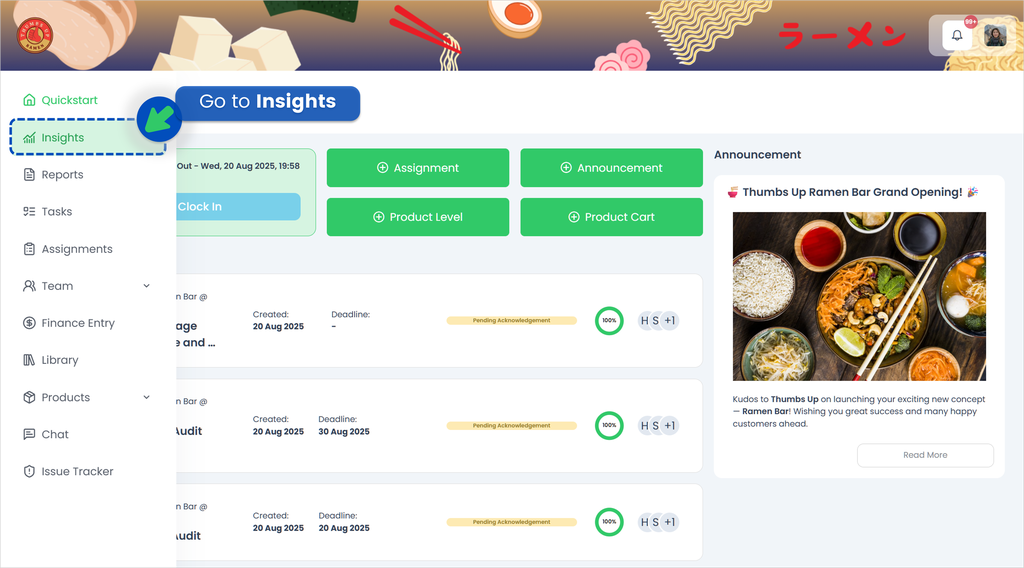
  1. Login to your TreeAMS account
  2. Hover over the left menu panel and go to Insights.
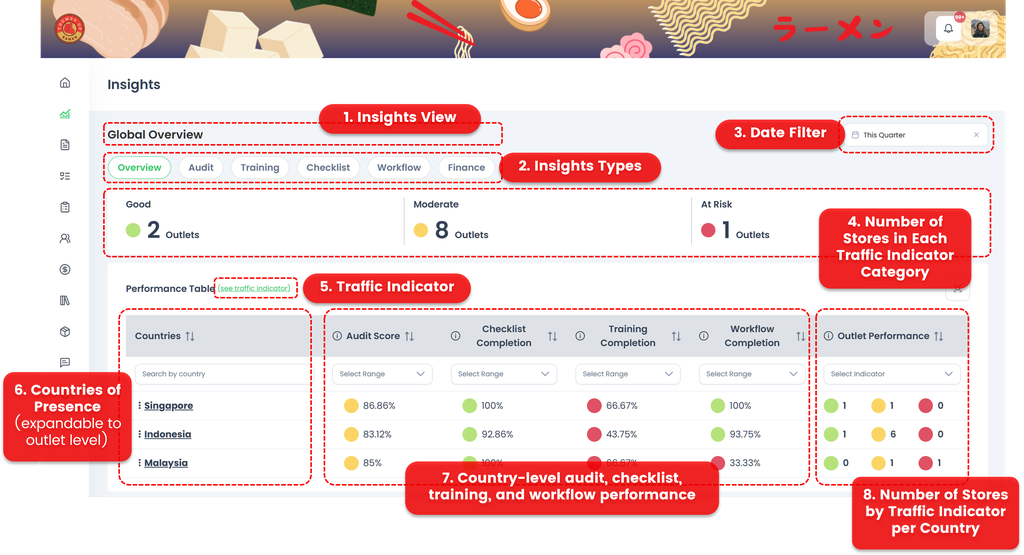
  3. Let’s explore the different functions available in TreeAMS Insights.
    * Clickable/expandable
    1. Insights View πŸ‘‰ The main dashboard that provides an overview of business performance.
    2. Insights Types* πŸ‘‰ Different categories of insights available, such as Overview, Audit, Training, Checklist, Workflow, and Finance.
    3. Date Filter* πŸ‘‰ A filter that lets you view insights by time period (e.g., this month, this quarter, this year).
    4. Number of Stores in Each Traffic Indicator Category πŸ‘‰ Shows how many stores fall into Green, Amber, or Red based on set thresholds.
    5. Traffic Indicator* πŸ‘‰ The threshold settings that determine whether a store or outlet is classified as Green, Amber, or Red. Please refer to How to Set Up Traffic Indicator for more information on setting different weightages for different modules. These weightages determine when the store is shown as green, amber, or red.
    6. Countries of Presence* πŸ‘‰ Displays the countries where your business operates, with the option to drill down to outlet level.
    7. Country-level audit, checklist, training, and workflow performance πŸ‘‰ Summarises operational performance across different modules for each country.
    8. Number of Stores by Traffic Indicator per Country πŸ‘‰ Breaks down store counts by traffic indicator (Green/Amber/Red) for each country.
How to Set Up Traffic Indicator πŸš₯

In TreeAMS, you can define what counts as good, moderate, or at risk. The default thresholds are shown in the image below. You can't adjust the weightage by yourself but you can request your consultant to adjust it if needed.
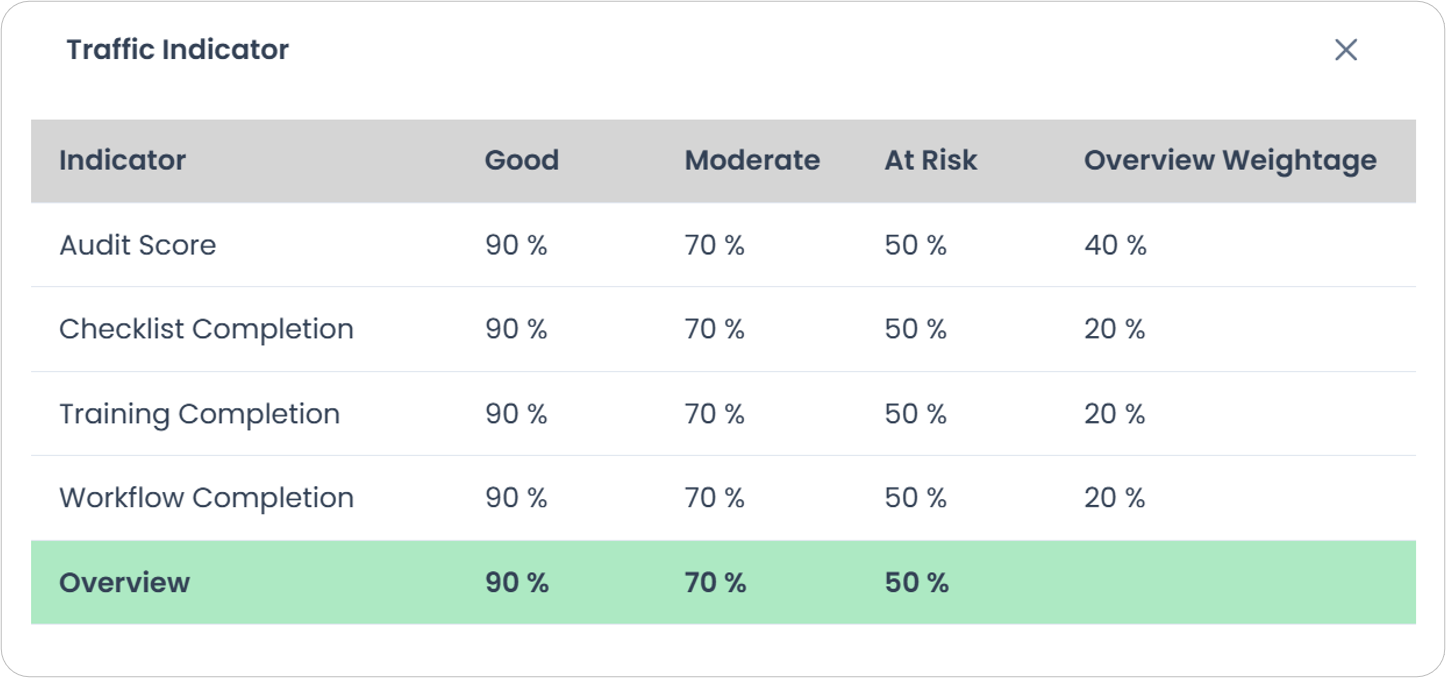
Here's how you can interpret these indicators:
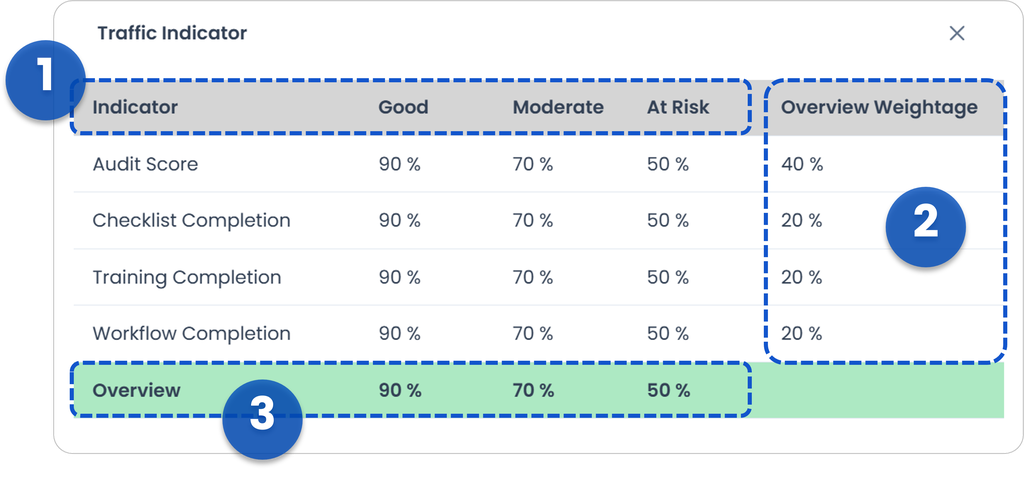
  1. Indicator
    The indicator shows the percentage that determines whether an outlet is Green (Good), Amber (Moderate), or Red (At Risk). You can set different percentage thresholds for each moduleβ€”Audit, Checklist, Training, and Workflow.
    Example: If the average audit score is 85%, the outlet will fall under Amber (Moderate).
  2. Overview Weightage
    This represents how much importance you place on each module.
    Example: In the image, the user assigns 40% weight to Audit, giving it more influence compared to the other modules.
  3. Overview
    This is the final color (Green, Amber, or Red) that reflects the overall performance of the outlet, based on the combined results and weightage of all modules.

Brand Filter on Desk vs Portal

Task Insights could applies brand selection differently between Desk and Portal to ensure dashboards display data from the correct brand.

  • On Desk, a global Brand dropdown is available. Users can switch brands manually, and the dashboard will update based on the selected brand.
  • On Portal, there is no brand filter. The system automatically uses the brand shown in the Portal Header, and Insights data will follow that brand context.


Default Brand Logic

  • If a user has multiple brands, the system will automatically use the default brand.
  • If the user has only one brand, that brand will always be applied.
Troubleshooting Tips
When Insights data looks incorrect, first confirm:
  • Are you accessing from Desk or Portal?
  • Which brand is currently selected?
    • For Portal:
      Check the Portal Header to confirm the active brand.
    • For Desk:
      Try switching to the correct brand using the dropdown, then refresh the page.
When to Escalate
Escalate if:
  • Changing the brand on Desk does not affect the data
  • Portal shows data from the wrong brand
  • The user has correct access but the brand is not applied

If you need assistance, please email us at connect@treeams.com.
We are happy to help! πŸ‘‹πŸ˜Š

Navigate TreeAMS Insights
tiffani edited 6 months ago

No Revisions

Page Settings
navigate-treeams-insights/
Discard
Save
Toggle Dropdown
Draft
Title
Enter title for the new Wiki Group

Previous Page

Left

Next Page

Right

On this page

  • Navigate TreeAMS Insights
  • How to Navigate TreeAMS Insights
  • How to Set Up Traffic Indicator πŸš₯
  • Brand Filter on Desk vs Portal
Review Changes ← Back to Content
Message Status Space Raised By Last update on